Showing posts with label Design Studio Software. Show all posts

Thursday, September 9, 2010

Aww Nuts!

I'm still playing with the super cute and fun Fhiona's Squirrel Friend set so I have another squirrel card to share with you today:

FhionasSquirrelFriend4a
First off, I've really been wanting some of the Kim Hughes' fonts from Scrap N Fonts, so when I heard they were having a dollar sale, I just couldn't resist! For this card, I used SNF Goody, which I just love (I SO wish I could write like Kim!! She's my handwriting hero!). I printed out the Aww Nuts! on the outside and then the part on the inside (which actually is the backside of the cardstock) before cutting my card down to 4.25" square.

I wanted to make a little scene for my squirrel, so I cut a tree and grass with my Cricut using the Wild Card Cartridge. I airbrushed the front with a light blue Copic, then stuck down all my elements.

And here's the inside:

FhionasSquirrelFriend4b
As you can see I just stamped the acorn on either side of the sentiment, then stamped the squirrel again at the bottom and gave him a little shadow with my W00 and W1 Copics.

This card is for Secret Crafter Saturday Challenge - Clean and Simple, and A Spoon Full of Sugar - anything with an animal on it.

I really liked pre-printing the sentiments right on the card base, so I'll be trying it again in the future. And of course, I have to make sure I use all of my new fonts! TFL!

Friday, August 6, 2010

Which stamp would you like to see?


Hi everybody and welcome to my stop on the mini hop for Day 7 of La-La's Birthday Beach Bash! If you came here from Kim's blog then you're on the right track. But if you just happened on this post, then please start at the La-La Land Crafts blog so you don't miss a stop on the hop! We're all giving away mystery party favors so make sure to comment on each hop post to increase your chances of winning!

Before I get to my card, I am so excited to tell you that Irina has introduced another image in the new Marci line - Marci Ballerina:


She's available as a digi image for one week only, so hurry over to the store and pick her up!

Today is my last day posting for the Bash, so I wanted to make a really special card, and I hope I succeeded:

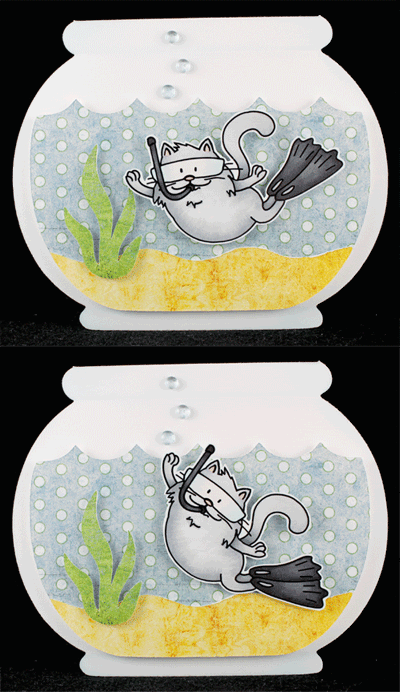
ShermanSnorkel1
What makes it extra special is that it's a tilt card! I put together a simple animated gif so you can how the tilt action allows Sherman to come up for air when needed:

Photobucket

I used Snorkel Sherman and this tutorial on Splitcoast. I used the Create A Critter cartridge for the fishbowl and had to make sure it was big enough for Sherman to swim around so my card is ginormous!! And by ginormous I mean 5.25" tall by 6.25" wide!

I colored Sherman with Copics, then cut him out leaving just a little white margin to make sure he stood out against the background paper. I cut all the other pieces with my Cricut and sponged the white bowl with some light blue ink to give it dimension. Lastly I followed the tutorial to put it all together and added some Dew Drops for air bubbles.

This card is also for the following challenges: I'm the last stop for today, so please head back to the La-La Land Crafts blog and leave your answer to the question "Which stamp would you like to see join the La-La Land family?" I hope you like my card and thanks very much for hopping with me this week!

Tuesday, July 27, 2010

LLWWC#49 - Shake It!


It's time for another La-La's Weekly Wednesday Challenge! I'm so excited to be hosting this week and I've chosen to challenge you all to make a shaker card! When I first started stamping many years ago, it was because I saw a guest on the Carol Duvall show make a shaker card! I ran out right away and bought a bunch of supplies (including a heat gun and embossing powder!) to make my own shaker card. It was pretty ambitious for a first project and came out pretty terrible, but it started me stamping so I'm glad I did it! Since then I've made a bunch of shaker cards and they're much easier to do than that first one!

In case you've never made a shaker card before, here's a great tutorial on how to make one. I actually make mine just a little differently, so I'll explain that below. For now, here's the card I made:

LalaPrincess2a
I used Princess Lala and my Cricut (I had to dust it off before using it!). I wanted the Lacy Labels cartridge as soon as I saw it and hubby was so sweet to get it for me!

When I make shaker cards, I use foam craft sheets for the innards instead of foam tape (or the hideous foam core board that I used for my very first one - SO hard to cut!!). I use 2 layers of the thin kind, but you could also use the thick kind. Or even just 1 layer of the thin stuff if your shaker contents will fit. Here's a picture of all the parts I used (minus the beads):

LalaPrincess2b
Lala was colored with Copics, and I airbrushed the edges of the circle with my Copic system so it wouldn't be so stark white. I also colored the edges of the foam layers with a Copic so it would match the purple card base. I even cut the foam with my Cricut using the deep cut blade and housing! The rollers smushed lines into the foam when it cut, but after sitting around for a while, the foam puffed back up to normal! Finally I just glued the parts together and added some beads for the shaker part.

This card is also for Charisma Cardz - Anything but Square, and Stamp Something - Something Flowery.

Before I go, I want to let you know that whatever image the hostess uses on her project is 20% off for the week of the challenge, so of course this week it's Princess Lala!

We'd love to have you play along with us! All the details can be found on the La-La Land Crafts blog. TFL!

Wednesday, March 10, 2010

La-La's Weekly Wednesday Challenge #29


Wednesday means it's time for another La-La's Weekly Wednesday Challenge! This week I'm hosting the challenge and because La-La Land Crafts released 6 awesome new Spring digi images last week, I decided to do a color challenge - please use pastel colors for your creations.

Here's what I came up with:


I picked Easter Bunny Rosie this week (isn't she adorable?!) and knew I wanted to do an egg shaped card with this Cosmo Cricket patterned paper as the decoration on the egg. Then I saw a card in the March issue of Cards Magazine that had an egg with a scalloped mat and knew I had to make a scalloped mat for my egg too!

I used Design Studio and the Doodle Charms cartridge because it already has an egg shape that I like. I cut one egg out of PP, then made a card base out of the same shape that I cut out of white cardstock. Lastly I had to create the scalloped mat by placing circles all around the plain egg shape, and then I cut that out of white CS as well.

Rosie was printed with my laser printer and colored with colored pencils and odorless mineral spirits. I cut her out, leaving a small white border so she would stand out from the PP background. I taped a strip of ribbon to the PP egg, then stitched it to the scalloped mat. I glued the egg to the card base, then added the image, 'bellies and a sentiment from Papertrey Ink. I hope you like it!

This is also for the following challenges: We'd love to have you play along with us! All the details can be found on the La-La Land Crafts blog. TFL!

Sunday, November 8, 2009

Your Next Stamp Blog Hop


Hey everybody! Thanks so much for joining us for another super awesome Your Next Stamp Blog Hop! Your Next Stamp has 3 new Fhiona sets (Wedding, Bad Hair Day, and New Year's) plus the Limited Edition Christmas digis that were recently released so the Starlets have whipped up some yummy eye candy for you using the new stamps!

You've reached the last stop on the hop! If you didn't come here from Stephanie's blog, you'll definitely want to go back and start at the beginning of the hop: If you comment at every stop on the hop, you'll be entered to win one of the brand new Fhiona sets (3 winners in all)! Also, Karen is looking for a name for Fhiona's best buddy/hubby, so anyone who posts a name suggestion on Karen's blog will get an extra entry into the Wedding Fhiona giveaway!

Lastly, each blog will be giving away 2 of the new Christmas digis to a random commenter! For your chance here at my blog, please leave a comment letting me know which of the new Fhionas or Christmas digis is your fave! The deadline for commenting for the giveaways is midnight EST, November 16 and all winners will be posted on Karen's blog on November 17. I will also be posting my digi winner here on my blog.

Here's the hop order again in case you missed it:


One last thing to mention before I get to my projects: Karen is offering 10% off all week, plus there will be a surprise gift in every order! The coupon code is YNSBH2.

*****And now on to the show!*****

For my first project, I used Bad Hair Day Fhiona as she was meant to be used. I paired her with some really old Rob and Bob paper and used a sketch from Unscripted Sketches.

BadHairFhiona1
She was colored with Copics and her brush was cut out and extra bristles popped up for dimension. I did a bunch of sewing and added the sentiment all cut up (I really love the look of this and have done it a bunch with my YNS cards).

For my next project, I decided to do another easel card since I had so much fun with my first one! I used Bad Hair Day Fhiona again, but this time I saw her all bundled up for the winter with a steaming cup of hot cocoa:

BadHairFhiona2a
This time I watercolored her and flocked the collar and cuffs of her robe. I used a sketch from Sketchy Thursday and some yummy papers from Basic Grey's Eskimo Kisses paper pad. This card also qualifies for Lili of the Valley - 3 papers, 2 stamps, 1 type of embellishment, Secret Crafter and Crazy 4 Challenges - both easel cards. Lastly, the sentiment is from Papertrey Ink.

Here's a close shot so you can see the coloring and flocking:

BadHairFhiona2b
My final project came from the lastest Splitcoast newsletter. Beate had a great tutorial for a luminaria that I thought would go perfectly with the new Christmas digis!

The opposite sides of the luminaria have the same design. Here's the first design using Stripey Snowman with Happy Holidays:

Luminaria1a
And here's the second design using Decorated Christmas Tree:

Luminaria1b
I liked the idea so much that I made it into a .cut file for the Cricut so I can make multiples for gifts! I used all of Beate's dimensions except I cut the height down to 4" so that I could cut 2 out of a 12x12 sheet of patterned paper. [If you'd like the .cut file, please scroll to the bottom of this post.]

Before I go, I want to remind you that there's still time to play in the YNS Challenge #3 - make a Christmas project without the colors red and green!

Whew! That’s all for now! I hope you enjoyed my projects and thanks so much for joining us on the hop!

**********

You can get the .cut file here and here's Beate's tutorial which tells you where to score.

If you like the .cut file, please leave me a comment and let me know. Also, I'd love to see any projects you make with my file! Thanks very much to Beate for such a fun project!!

Saturday, July 11, 2009

Penguin Cupcake

Today's card is based on the Cupcake Inspiration Challenge #14 at the Hope Stamps Eternal blog. I went very literal again as I HAD to use the Imaginisce penguins that I'm sure the cupcakes were based on:


It's also for Paper Bloom's Shape Up Challenge, which is to make a shaped card.

In case you can't tell, the top of the cupcake is supposed to be a little island and the bottom is the ocean. Yes, that's real sand on the top! I cut the cupcake and the tree with my Cricut using the Doodlecharms cartridge.

I was going to use the penguin stamps, but they were a little too big for my cupcake so I cut these out of a sheet of patterned paper and they're just the right size! I added some Stardust sparkle to the "ocean" and little rhinestones for the coconuts and on the flower.

I hope you like it and TFL!

Other materials used: blue cardstock - Core'dinations; green and brown cardstock - Bazzill; twine and sentiment (Mixed Messages set) - Papertrey Ink; Brilliant Blue ink - Stampin' Up!; tag - Cuttlebug.

Monday, April 20, 2009

Forest Fairy Card

The funny story about this card is that I was preparing for last week's Club Anya Blog Hop and for some reason, I thought the fairies were considered Anyas. I had my card done and photographed and was linking up my post when I finally realized the fairy didn't count as an Anya!! I panicked because it was super late the night before the Hop and I didn't have time to do another project, so I ended up posting the barn card that I had made previously, but hadn't gotten around to posting yet. So today I'm showing you what I originally created for the Hop.


A little while ago, I made this Fairy Chloe with glittered acetate wings and wanted to show her off, so I thought of making another 3-D shadow box card. It actually does fold pretty flat for mailing, but then can be opened up by the recipient and will stand on its own (please click to enlarge):


Little details: Chloe's dress is paper pieced, and I actually added separate sleeves and a skirt for more dimension. I added just a touch of sparkle on her dress with a glitter pen. The deer from Forest Friends is done with fun flock (the same way I did Flopsey in my last post) and then I added an eye stamped on white cardstock so it wouldn't be fuzzy (ewwwww - fuzzy eyeball!):


The squirrels are also from the Forest Friends set, the little birds are from the Wishing Tree set, the big bird is from the Pretty Hat set, and the For You banner is from the Lucky Bunnies set.

Here's a close shot of the adorable squirrels:


Lastly, I cut the tree, grass, and the opening in the card with my Cricut. I hope you like it and TFL!

Saturday, April 4, 2009

Don't Be A Square Challenge

The latest challenge on The Greeting Farm blog is to make a non-square or non-rectangle card. I decided to make Angel Anya sitting on a cloud:


I cut the cloud on my Cricut using the Hello Kitty Greetings cart, and used Design Studio to make it into a card and sized it how I wanted. I also cut an extra full cloud shape, and then a smaller shape to serve as the pattern for the felt. I cut out the white felt and hand-stitched it onto the extra cloud shape with light pink rayon embroidery floss (it has a slight sheen that's really pretty). I stuffed it just a little so it has a nice puff.

Angel Anya has multiple layers for dimension that you can see better in this shot:


I added an extra face, bangs, arms and wings, as well as a paper pieced bow and dress. For the wings, I outlined with a Stardust glitter pen, then drew the glitter around with my waterbrush. This method fills in the area with a more subtle glitter sparkle than just filling in with the pen. I then went over the lines with Stickles. I also Stickled the halo.

I attached tiny little bows to her dress and a half pearl to her bow. The beaded pin is Making Memories, the ribbon is May Arts, the tag is Spellbinders and the sentiment is Stamping Bella.

Here's a shot of the inside where you can see I created a mirror image Anya. I paper pieced, embellished and colored her the same as the outside, but I didn't do all the 3D work:


I did this because I didn't want to hand draw a back to her, and I didn't want just a plain white back, or even worse, the back of my cardstock where the Copics bled through!

I really like shaped cards, so this was a super fun challenge for me! TFL!

Wednesday, April 1, 2009

Woven Easter Basket Card

I haven't played with my Verve stamps for a while, so I decided to break them out and participate in this month's Project Parade, which is to create an egg-stra special spring project. Unfortunately I don't have any of their Easter stamps, so I used my Cricut for the egg-stra part, and the Petals & Stems set for the spring part. Here's what I came up with:


The basket and eggs are from the Doodlecharms Cartridge. I used Design Studio to make the basket into a card and size it exactly how I wanted, and then I also cut a regular basket so that I would have an extra layer to sandwich the eggs, hide the back of the weaving, and also for the detail cut lines on the basket. I cut 3 extra lines on the regular basket in between the cuts that were already there. I used my trimmer to cut a bunch of 1/2" and 1/4" strips, and then wove them into the basket.

For the eggs, I cut 3 regular eggs, and then 3 flipped eggs so that I could make them double-sided. I didn't want stark white backs when the card is opened. For some extra dimension, I shaped them a little and put a big foam circle in the center of each to puff them up. Here's the open view:


The sentiment was done with (appropriately) Doodlebug rub-ons. The card is approximately 4 1/4" x 5 1/4" so it fits nicely into an A2 envelope.

Last note: I used a tip from Jody Morrow to briefly hit the ribbon with my heat gun to get that wavy look. It also relaxed the tails a bit so they weren't just sticking out straight to the sides. Thanks for the tip Jody!

Other materials used: patterned paper - DCWV Nana's Nursery Baby Girl; ribbon - May Arts; buttons and floss from my stash.

Wednesday, March 25, 2009

Pop-Up House Card

I have a book called Pop-Up Paper Structures by Heidi Pridemore that has a pop-up house project in it that I've been wanting to try for a while, so I created a version for the Cricut, changing the dimensions and scalloping the roof to get a house shape that I liked better. Hope you enjoy it! And do check out Heidi's book - it's got lots of really cool projects!


You can get the .cut file here, and PLEASE also download my notes file, which has the instructions on how to actually put the card together. FYI - the file does not include the windows or doors, just the plain house base and roof. If you like it, please leave me a comment and let me know. Also, I'd love to see any projects you make with my file!

Last note: I prefer using Plantin for all my files because I love using the endcaps feature to make a lot of my score lines, and some cut lines. Unfortunately, Plantin doesn't have a triangle, and I couldn't figure out an easy way to make one, so I used George just for the triangles. I'm sorry if you don't have both carts, but I've seen both of them for sale so if you really want, you can get the carts, or you can feel free to modify the file as needed.

Tuesday, March 17, 2009

MFT Idol Challenge #1

Sorry I haven't posted in so long, but it's because I've been feverishly working on the first MFT Idol challenge!! Yes - I made it into the Top 10!! I'm so excited, but also incredibly stressed out - I have to make the most awesome, fantabulous cards I've ever made in my whole life!

Here's the first one that I hope will keep me in the competition a week longer:


This is me celebrating making it into the Top 10. I used An Owl for All Seasons for the owl and the sentiment, and I embellished my little heart out!

But wait - there's more! Here's what the inside looks like:


This is a tribute to everyone who made it into the Top 10! I cut the letters on the top with my Quickutz dies and Doodlebug Sugar Coated cardstock (hope you can see the sparkle). All the owls were paper pieced and their little faces done on white cardstock colored with Copics. Then I fancied them up with Stickles, and some tiny flower rhinestones.

And they're all stuck to this double tiered stage that I created myself for the Cricut! I've been doing a lot of Design Studio work using other people's patterns, so I'm really proud that I actually thought this up and created it all by myself!! I learned the basics of designing pop-ups from The Pop-Up Book by Paul Jackson, and then I worked a LOT of hours to create this. The curtained part is a separate piece that I just hand cut and glued around the stage.

Here's an angled, closer view of the stage:


And this final picture is looking down on the card so you can see the "floor" in front of the stage:


For the sentiment, I used the Congrats from the Digital Girl set, and the exclamation point from Window Shopping. BTW - here's a little tip for masking your clear stamps - I use little pieces of acetate instead of tape - they stick to the clear stamp and you can just wash them off and they're re-usable.

Last note - the card really does fold down - all the pop-up parts really work!

I hope you all will go and vote at the MFT Forum at Splitcoast [voting starts at 10PM EASTERN time on Tuesday, March 17th and continues through Wednesday, March 18th at 10pm EASTERN. My SCS user name is mm9772] and I really hope that I'll be able to stay in the competition for at least one more round! TFL!

Other materials used:
Ink: Graphite Black Brilliance ink - Tsukineko; Raspberry Fizz - Papertrey Ink Cardstock: Bazzill; Doodlebug (White Sugar Coated)
Patterned paper: Basic Grey (Eva 6x6 paper pad)
Embellishments: satin ribbon - MFT; small fern punch - CarlaCraft; flower and star rhinestones - Queen & Co.; white brad - Pink Hedgehog Papercrafts; Marisa Mini dies - Quickutz; Labels Trio dies - Spellbinders; Scallop Border Punch - Stampin' Up!; Stickles Glitter Glue; lace, embroidery floss, and buttons all from my stash.

Sunday, March 1, 2009

3-D Cake Card

Ever since I saw the ad for the new cake 3-D Pop-Up die from Sizzix, I've been wanting to try making one, but just couldn't figure out the engineering. Then I noticed that the Sizzix website had an instruction sheet online for it, so I was finally able to duplicate it in Cricut Design Studio and here's my card:


I know it's not decorated very nicely, but I was just so excited that I wanted to share right away!

Here's the top view. I did the words with the All Mixed Up cartridge and all the patterned paper is from Basic Grey.

You can see there's a little tab at the top where you can attach whatever decoration you want - a candle, flowers, tiny bride and groom, etc.

I'm having so much fun opening and closing it - I just have to make more! TFL and hope you like my little project!

Edited AGAIN to add:

I've removed the .cut file upon request from the creator of the die, so please do not ask me for it. Thanks!

Monday, February 23, 2009

Party Like A Rockstar!

Last night I checked one of my fave Cricut blogs, Capadia Designs, and came across the COOLEST card idea [<--link here]!! Thanks to all of Diane's pictures and super clear explanations, I was able to come up with my own version pretty easily! Here it is:
The first four-letter word that popped into my head was "rock," so my next thought was Rockstar Anya from The Greeting Farm, and she was a perfect fit!

When folded flat, the card is 4 1/2" x 6". I recently got a box of envelopes that were labeled invitation size, but are actually a little larger so that you can fit a 4x6 picture inside. I figured I might as well take advantage of that extra space!

I also used Diane's idea of cutting a separate front part to emboss, but I made it just a little smaller all around to give me a border. I also did a piece for the back and embossed both with the Cuttlebug Allegro embossing folder. Then I distressed both pieces and sewed them on with a zigzag stitch. I'll probably skip that step next time since it was really time consuming going around all those steps!

Here's another angle where you can see the ROCK a little better:


And here's how it looks folded flat for mailing:


The "party like a" was done with the Hello Kitty Font cartridge and the big star was done with the biggest of the star Nestabilities. I went over all the edges of the ROCK with a stardust glitter pen and I edged the star with silver glitter glue. The final touches were some Heidi Swapp ghost stars, a little silver edged organdy ribbon and silver cording. I just love how this came out and will definitely make more!

A huge thanks to Diane at Capadia Designs and to Lacy for suggesting the idea!!

Monday, February 16, 2009

Winner and Purse Favor Box

Ok, I know why you're here - to find out who won the Bella Blog Candy! But first I want to thank everybody for playing in my blog candy giveaway - it was so interesting to read about your fave Stamping Bella images, a lot of which are my faves too!

[This section deleted because I had to pick another winner.]

* * * * *
And now for yet another Cricut project:

Last year during our trip to California, I bought a couple of little purse boxes that were on clearance after Valentine's Day. I thought I could pull it apart, trace it, and make my own versions of it. Well I tried it, but for some reason just couldn't make it work quite right, so I gave up.

The other night I got an idea that I might be able to replicate the purse box in Design Studio so I spent many hours working, testing, re-working, testing, etc., and I did it!!

Here's a pic of the original box:

And here's my Cricut version (I didn't do a very good job of decorating this one, but you get the idea!):
Here's how it looks from the side (you can see it's pretty narrow at the top):
And here's how it looks open:
I thought the design of the original box was very clever being able to open up like that. Because the top is so narrow, it could be difficult getting things in and out of the box. Because of that, I tried to stick to the original design as much as possible.

BTW - the box dimensions are: 2 3/4" wide, 1 1/4" deep at the bottom, 3/8" deep at the top, and 1 3/4" tall.

If you have the Tags, Bags, Boxes & More cartridge, you might have noticed that my box looks very similar to the purse2 design. I noticed this AFTER I had already almost finished doing my box and thought I just wasted a LOT of time!! However, after cutting the purse2 file, I don't care for it as much as this box. As I mentioned above, I really like having the box open up fully for easy access, and this one doesn't. Also, a couple of the side tabs for gluing can be really skinny depending on the size you cut (on this size they are only 3/16" thick) and makes it a little harder to work with. But it's still a really cute box, so it's nice to have the option to make it too! And of course the TBB&M version is sizeable so that's a huge plus!

Anyway, thanks for visiting and I hope you like this little box!

ETA: I've had several requests for the .cut file, so you can find it here, and PLEASE also download the notes file.

If you like it, please leave me a comment and let me know. Also, I'd love to see any projects you make with my file!

Friday, February 13, 2009

Round Top Favor Box

Lauren Meader has been showing samples of her soon-to-be-released My Timeless Template called the Rounded Wrap Up Box, and the more wonderful creations she showed, the more I wanted to make one! Of course I had to do it in Cricut Design Studio (because I am obsessed with making things in it!), and I also wanted to showcase some of the awesome patterned paper I have, specifically from the DCWV Sweet Stack (the 12x12 version).

Here is the box I came up with - front view:

And back view:

My box is 3" wide, 1.5" deep, and about 3.25" tall. I modeled most of the measurements after my treasure chest boxes, and then adjusted whatever looked funny.

After creating and testing the DS cut file, I had some plain white cardstock with the shape of the box cut out of it. Instead of trashing it, I kept it to use as a placement template.

I took this sheet (which is one of my favorites in the whole stack)
and laid my placement template over it, positioning the template so the cupcake would be centered on the front of the box. Then I made marks on my PP where the edges of the template were and cut on the marks on all 4 sides of the PP to get a sheet 8x9.5".

Next, I simply placed my PP face down on my Cricut cutting mat exactly how the white cardstock had been placed and hit cut. I also created a separate page in the same file to make the score lines, so I had to adjust my blade depth and pressure and hit cut again.

Here's a shot of the paper on the mat after cutting and removing the excess paper (please excuse the weird glare off the mat):
You can see that I also put a couple little slots on the cut file to tie ribbon through.

And then after taking the paper off the mat:

Then I just folded on all the score lines, glued it together, and added a little ribbon. I love how the pattern on the paper is perfectly placed on the box, and makes it look like I actually took the time to decorate it!

I hope you like my little box, and don't forget to check out Lauren's blog and all of her My Timeless Templates at Papertrey Ink! Thank you so much to Lauren for all of her creativity and inspiration!!

ETA: After a few requests, I have uploaded the .cut file for this box. If you like it, please let me know by leaving a comment. Also, if you make anything with the file, I'd love to see it!

Friday, February 6, 2009

Treasure Chests

After I saw this super cute treasure chest project, I knew I had to try and recreate it for the Cricut. I used Plantin Schoolbook for all of them.

First, I tried to copy the original project dimensions exactly (with just one small modification that I'll talk about below) and ended up with this:


After I assembled the pieces (there is a base piece and another piece which forms the lid), I decided to add handles, so I punched 2 holes on each side and added 2 bits of ribbon. I also embellished with a couple of Prima flowers and a Doodlebug rhinestone.

Next I decided I wanted to play with the sizing to make the box a little shorter, and also see if I could do the whole thing in one piece. Here's the result:
I left this box undecorated so you could see the modification I was talking about earlier - I added a half circle slot so that the lid can just be tucked in to hold the chest shut instead of adding velcro. The original chest was 3" tall, and this chest is 2.5" tall.

Next I decided to make the chest even shorter: 2.25" and I simply rounded the corners of the lid, instead of adding the scallop border:
As you can see, I hid the half circle closure with Primas and added handles again. By using patterned paper for the chest, I think it barely needs decorating at all!

Hope you like them and a big thanks to Katie Rentz for the original project!

ETA: After several requests, I've made the .cut file available for download. If you download the .cut file for this project, please also download my notes file!! I've only included the .cut file for the 2.5 inch chest (the middle one) because that's my favorite size and shape! Here are the links to the .cut file and the notes file.

If you like the project, please let me know by leaving a comment. Also, if you make anything with the file, I'd love to see it!

Wednesday, January 21, 2009

Pretty Hat Anya and Fancy Label

I was inspired to play with my Cricut Design Studio software after seeing some of the new die sets that Spellbinders is releasing, especially this one called Labels 4. I wanted to make creating it easy, so I simplified the shape a lot (although if I play around with it some more, I could probably get it a little closer to the original). It was done with the shape that looks like the Stampin' Up! Top Note die from Accent Essentials (it's called Accnt48s). I simply used the exact same shape 4 times and came up with this cool label shape:
The best part is that I did it all in the same selection box and used the nudge tool so that it can be easily sized however I want (you have to understand DS to get that). I have to admit that I'll probably still buy the Nesties (I really love the embossing effect and also airbrushing with the die in place), but at least this gives me more options!

Anyway, on to the card I made:
The label is sort of fancy so I immediately thought of Pretty Hat Anya to go with it. All the patterned paper is Wild Asparagus. I've been hoarding this pretty floral paper forever and thought it also went perfectly with Pretty Hat Anya. The image is colored with Copics and the pearls are puffy pearl paint.

A few details: there is a real little button sewn onto her hat, I stitched over the X on her hat too, and popped up the hat just in the middle for some dimension. Lastly, I used dimensional adhesive on her shoes to look like patent leather.


I hope you like the label and the card! TFL!